
Technology
JanitorAI: How It Works, What It Costs and What to Know in 2026


JanitorAI is easiest to understand as an AI character platform rather than a conventional general-purpose chatbot. You choose or create a character, define a personality and scenario, and then carry on a conversation in which the system tries to preserve that fictional role. The interface is simple; the system behind it is not.
That complexity explains why two people can use the same character and report very different experiences. One may get coherent, detailed roleplay while another sees repetitive replies, broken continuity, or a character that slowly stops behaving like the original persona. The difference can come from the character definition, context handling, generation model, routing path, or platform settings.
I reviewed a current sample of high-visibility JanitorAI pages and found a recurring pattern: most explain what the platform is, list features, discuss adult access, and repeat pricing or safety claims. Fewer explain how those pieces interact. This guide focuses on that missing layer—what actually determines the experience, where hidden costs appear, and which claims deserve verification.
The official JanitorAI site currently presents the service as an adult-oriented character-chat platform with a large community character library. Third-party pages disagree on some current figures and architecture details, so I treat changing numbers as snapshots rather than permanent facts.
What Is JanitorAI?
JanitorAI is a conversational AI platform centered on user-created characters. A character can include a personality, background, speaking style, scenario, opening message, and other instructions that shape how the bot responds. The platform is particularly associated with roleplay and interactive fiction, but the same framework can support creative writing, romance, fantasy, anime-inspired scenarios, and original stories.
The key distinction is between the character layer and the model layer. The character defines what the AI is supposed to be; the language model generates the response. If the underlying model, context policy, routing, or generation settings change, the same character can behave differently without the character card changing.
That separation is why a character library should not be judged only by its size. A beautifully written character card cannot fully compensate for weak context retention or poor instruction following. Conversely, a strong model can make an average character feel better than expected.
How Does JanitorAI Work?
At a simplified level, a JanitorAI conversation combines the character definition, the user’s persona or prompt, recent conversation history, system or platform instructions, and the selected generation model. The model predicts the next response from that combined context.
Character chat is stateful. A roleplay session may depend on names, relationships, locations, promises, objects, plot events, and personality traits from many earlier turns. Once important details fall outside usable context, the model may stop behaving as though it remembers them.
This is why memory should not be treated as one magic feature. There are separate questions: how much recent conversation fits into context, whether older information is summarized or stored, and whether the model can consistently use that information. More context can help, but it does not guarantee perfect recall.
| Layer | What it controls | Why it matters |
| Character card | Persona, backstory, scenario, style | Sets the behavioral target |
| Conversation context | Recent dialogue and instructions | Determines continuity |
| Generation model | Language quality and instruction following | Shapes response quality |
| Routing/API | Where inference is processed | Can affect cost, privacy and latency |
| Platform controls | Accounts, publishing, moderation and access | Sets user-facing boundaries |
What Makes a JanitorAI Character Good?
The strongest characters usually do more than provide an attractive description. They establish a stable identity and give the model concrete material to act on. A useful definition should answer five questions: Who is the character? What do they want? How do they speak? What do they know? What should happen in the opening scene?
Behavioral specificity is especially useful. “Confident and mysterious” is vague. A stronger instruction describes observable behavior: the character answers briefly when suspicious, avoids admitting uncertainty, uses formal vocabulary, or becomes protective when a particular subject is mentioned.
The opening message matters because it establishes the initial scene, emotional state, and narrative voice. A generic greeting forces the user to create momentum. A strong opening gives the conversation somewhere to go without locking the user into one outcome.
There is a trade-off. Overloading a character card with hundreds of rules can make prioritization harder. A compact, internally consistent definition is often more useful than a huge biography full of contradictions.
JanitorAI Pricing: What Is Free and What Can Cost Money?
Pricing is one of the areas where 2026 information can become outdated quickly. Current public sources describe a free core experience and an optional janitor+ subscription, while external-model/API usage can create a separate cost. So “Is JanitorAI free?” has two answers: the platform can be used without a paid subscription, but higher-end model usage or external API access may introduce additional spending.
A current third-party review citing the 2026 janitor+ launch reports a $12.99 monthly price and additional context/priority benefits. Other pages still display older figures or different plans, which is why the live official offer should be checked before purchase.
| Cost component | Typical question | What to verify |
| Free platform access | Can I chat without subscribing? | Current account and message rules |
| janitor+ | What does the subscription improve? | Current price, context, priority and included features |
| External API/model | Do I pay the model provider? | Token pricing, key requirements and provider terms |
| Router/credits | Is model use metered separately? | Current credit, expiration and refund rules |
The hidden-cost issue matters more than the headline subscription price. If a user connects an external model, total monthly spending can become the platform subscription plus model consumption. Heavy roleplay can also generate substantial token usage because context is repeatedly processed with new responses.
JanitorAI vs. a Standard AI Assistant
The difference is less about whether both systems use large language models and more about the unit of interaction. A general assistant is usually optimized around tasks, questions, information, and productivity. JanitorAI is optimized around persistent fictional identities and user-directed scenes.
| Dimension | JanitorAI-style character chat | General AI assistant |
| Primary unit | Character and scenario | Task or question |
| Interaction goal | Roleplay, story or persona continuity | Answer, create or solve |
| Customization | Character cards and personas | Instructions and presets |
| Context challenge | Long-running narrative continuity | Task-specific context |
| Best evaluation | Consistency and immersion | Accuracy and task completion |
This distinction changes how failures should be judged. A factual error in a research assistant can be critical. A continuity error in roleplay can be the main reason a user abandons a character. Conversely, a roleplay platform is not a substitute for source-verified research simply because it can produce fluent text.
Is JanitorAI Safe and Private?
Safety and privacy are separate questions. “Safe” can refer to content policy, age restrictions, account security, payment safety, or exposure of private conversations. “Private” can mean whether character creators can read chats, whether the platform stores conversation data, and whether an external model provider receives prompts.
The official JanitorAI site says character creators cannot see users’ private conversations and that users can control whether created content is public. That addresses creator visibility, but it does not answer every data-retention or third-party-processing question.
The processing path matters. When a platform-hosted model handles a conversation, the platform is part of the processing chain. When a user connects an external provider, that provider may receive the prompt and relevant context. A privacy decision therefore requires reading both the platform’s current policy and the model provider’s policy.
I would avoid entering real names, passwords, financial information, private client material, confidential work documents, or other sensitive data into character chats. Conversational intimacy is not the same thing as a confidential relationship.
Age rules also matter. Current public materials describe JanitorAI as an adults-oriented service, and regional markets can introduce age-assurance requirements. Users should verify the current rule that applies to their location.
What Are the Biggest Practical Limitations?
- Consistency: long conversations create more opportunities for a model to forget details, contradict earlier events, or fall back to generic dialogue.
- Model dependency: response quality can change after a backend or routing change, even when the character card stays identical.
- Cost complexity: external models can improve quality or control, but they can also turn a simple chat platform into a model-management project.
- Community variance: a large character library creates choice, but quality is uneven. Popularity does not prove a character card is well designed.
- Privacy ambiguity: creator visibility is only one layer; platform storage and external-provider processing are separate questions.
A Better Way to Choose a JanitorAI Character
1. Read the character definition instead of judging only the thumbnail or title.
2. Check the opening message for a clear scene, relationship and narrative voice.
3. Look for concrete behavioral instructions instead of a long list of vague adjectives.
4. Start with a short test conversation and deliberately change the scene to see whether the character adapts.
5. Test continuity by referring back to a specific earlier fact.
6. If the character repeatedly ignores its defining rules, try another model or character before spending more money.
What the Current SERP Gets Right—and Misses
My current SERP sample included complete guides from RCN Guide, Qanispot and Geonode, review pages from AI Companion Radar, Scrutool and DreamGen, plus safety-focused pages and older explainers. Their strongest common coverage is straightforward: what JanitorAI is, how characters work, pricing, safety, APIs, and alternatives.
The recurring weakness is fragmentation. One page may describe JanitorAI mainly as a frontend while another presents it as a self-contained platform. A pricing page may quote an older plan while a newer review discusses janitor+. Safety pages often focus on creator access without fully explaining the distinction between platform processing and external model processing.
That gap creates a more durable editorial angle: explain the system and show readers which variables they should verify. This keeps the article useful even when JanitorAI changes a model, subscription, mobile app, or regional rule.
How JanitorAI Fits Into the Wider AI Ecosystem
JanitorAI belongs to the broader shift from prompt-only chat toward persistent personas and interactive agents. The same technical ingredients—large language models, context management, retrieval, user profiles and routing—can support everything from roleplay to customer-service agents.
For publishers and AI users, this creates an important distinction between a platform and a model. A platform can change which models it supports without changing its character ecosystem. Model benchmarks and platform reviews can therefore age at different speeds.
For related AI research, these internal Aperplexity resources provide useful adjacent context:
AI Text Detector: Accuracy, Tools and Limits in 2026— read the guide
Web Development Best Practices: A 2026 Quality System— read the guide
Word Counter: Accurate Word & Character Counts in 2026— read the guide
Interview Questions: 21 Smart Answers for 2026— read the guide
The Future of JanitorAI in 2027
The direction of character AI is likely to be shaped by three pressures: better context, stronger personalization, and tighter platform governance. Users want characters that remember more and behave consistently. Platforms must balance that demand against inference cost, privacy, moderation, age assurance, and the complexity of supporting multiple model providers.
Model routing may also become less visible to ordinary users. Instead of asking everyone to understand API keys, model names and token pricing, platforms can expose quality or speed controls while handling routing behind the scenes. That could simplify character AI, but it makes transparency about model selection and data processing more important.
Another likely development is richer character state. Instead of relying only on a conversation transcript, platforms can maintain structured facts about a story, relationship or world. The challenge will be deciding which facts deserve to persist and preventing incorrect memories from becoming permanent.
These are ecosystem-level directions, not confirmed JanitorAI roadmap commitments.
Key Takeaways
- JanitorAI is a character-and-conversation platform whose experience depends on both the character definition and the model generating responses.
- A large character library creates choice, but character quality is uneven and popularity is not a substitute for behavioral consistency.
- Long-chat quality depends on context, memory behavior and model instruction-following—not simply on whether a platform advertises “memory.”
- The real cost can include both a platform subscription and external model/API consumption.
- Creator privacy and model-provider privacy are different questions and should be evaluated separately.
- For 2026, the most durable evaluation is workflow fit, transparency, character quality, context handling and total cost.
Conclusion
JanitorAI is more interesting than a simple “uncensored chatbot” description suggests. Its core value comes from combining community-created characters with conversational models and giving users a framework for long-running fictional interactions. That also creates its central weakness: the experience depends on several moving parts, and a change in any one of them can change how a character feels.
The practical lesson is to evaluate the whole workflow. Look at the character card, test continuity, understand the model path, calculate the real cost, and separate creator visibility from platform and provider data processing. If a conversation becomes repetitive or forgetful, changing the character or model may matter more than paying for another feature.
Because JanitorAI is changing quickly, current pricing, model availability, age requirements and privacy language should be checked against live documentation before publication. A useful guide should explain what is stable and what is a moving target.
Frequently Asked Questions
What is JanitorAI?
JanitorAI is a character-focused conversational AI platform where users can interact with community-created personas or create their own. It is especially associated with roleplay and interactive fiction.
Is JanitorAI free?
The core experience can be used without a paid subscription, but current paid options and external model/API connections can add costs. Check live pricing and model-access rules before subscribing.
Does JanitorAI use its own AI model?
Current public sources describe a hosted Janitor model as well as external-model/API options. The exact lineup can change, so current platform announcements are the safest source.
Can JanitorAI character creators see private chats?
The official site says creators cannot see private conversations. That does not mean a conversation is invisible to every system involved in processing it; platform and external-provider policies should be considered separately.
Why does a JanitorAI character forget details?
Long conversations can exceed usable context or fail to preserve older information reliably. Model behavior, context limits, summaries and character instructions can all affect continuity.
Is JanitorAI an AI model or a platform?
It is more useful to think of JanitorAI as a platform and character ecosystem. The language model generating a response is a separate layer of the overall system.
Methodology
I researched this article on September 26, 2026 and reviewed a current high-visibility SERP sample for “janitorai” and close variants. The sample included the official JanitorAI site, RCN Guide, Qanispot, Geonode, AI Companion Radar, Scrutool, DreamGen, Scribe, Know Your Meme, and other current review or explainer pages. Search order varies by location, device, personalization and index freshness, so this is a competitive sample rather than a permanent ranking claim.
The recurring SERP strengths were basic definitions, character libraries, pricing, safety, API configuration and reviews. I differentiated this article by emphasizing the separation between character layer and model layer, context and memory as distinct mechanisms, total-cost accounting, creator privacy versus provider processing, and practical tests readers can run before trusting a character.
For validation, I prioritized the live JanitorAI site for current product claims and cross-checked current 2026 reporting and reviews for pricing, model and policy changes. I did not access private infrastructure, inspect JanitorAI source code, conduct a controlled benchmark of model quality, or independently verify every user-count or character-count claim displayed by third-party pages. Where public sources conflict, this article treats the information as a changing snapshot.
AI assistance was used to support research organization and drafting. A human editor must review the article before publishing, manually verify named claims, current pricing and policy details, confirm every internal and outbound link remains live, and ensure that first-person research wording accurately reflects the editor’s real process.
References
- JanitorAI. (2026). JanitorAI official platform and product information. https://janitorai.com/
- AI Companion Radar. (2026). Janitor AI review 2026: Pricing, features, verdict. https://aicompanionradar.com/apps/janitor-ai
- Geonode. (2026). What is Janitor AI? Safety, privacy, APIs, and proxies. https://geonode.com/blog/janitor-ai-privacy
- RCN Guide. (2026). Janitor AI: The complete guide. https://rcnguide.com/janitor-ai/
- DreamGen. (2026). Janitor AI review: Hands-on testing, memory and policy. https://dreamgen.com/blog/articles/janitor-ai-review
- Scribe. (2026). What is Janitor AI? 2026 guide. https://scribehow.com/o/vIa5lrjyT067Bv8FX6dnig/page/What_Is_Janitor_AI_2026_Is_It_Safe_Legit_and_Worth_It__3f2uv3JgQVm_4bd8_OFVoQ
- Know Your Meme. (2024). What Is JanitorAI? The roleplaying fantasy chatbot site, explained. https://knowyourmeme.com/editorials/guides/what-is-janitorai-the-roleplaying-fantasy-chatbot-site-explained

iGram Telegram is associated with an unofficial Telegram client, but the striking finding in 2026 is not an exciting new feature: prominent historical listings show an app that has been absent from Google Play for years. Searching “igram” can also lead to an unrelated Instagram-downloader service, so the name alone does not identify a trustworthy app or download.
That distinction changes the right questions. A third-party Telegram interface can offer different chat controls while still using Telegram infrastructure. Yet the application running on an Android phone can read what the user sees, store local material, handle credentials and request permissions. Connection to Telegram servers does not remove the need to trust the client itself.
Archived information is fragmented. AppBrain describes an app by Farasa; a separate GitHub repository identifies an iGram-branded Telegram API project by Nujen Co. These should not automatically be assumed to be the same maintained product. An AlternativeTo entry marks IGram discontinued. None of these records proves that every package currently circulating with the name is malicious. They do show why a blanket recommendation to install “the latest iGram APK” would be irresponsible.
The useful approach is to separate confirmed Telegram mechanics, historical product claims and unanswered questions. This guide does that, then offers a practical way to inspect an existing installation, decide whether the extra interface is worth it, and move back to official Telegram without overlooking device-specific conversations.
Which iGram are people searching for?
The Telegram client versus the Instagram downloader
The name “iGram” is ambiguous. This article concerns Telegram-based messaging applications described in older Android directories, not a tool used to download Instagram media. A URL containing a familiar spelling is not evidence of an official developer relationship. Check the exact Android package name, signing certificate, publisher and release history before treating a listing as the same application.
What the archived records actually show
AppBrain lists “Igram” by Farasa, version 4.6.0, with a reported last update of February 19, 2018 and removal from Google Play on February 13, 2019. AlternativeTo lists IGram as discontinued. A separate iGramApp GitHub repository describes an unofficial Telegram API client but has a very small visible commit history. These records are clues about historical products, not a current security audit or a reliable source for a new APK.
| Evidence | What it supports | What it cannot prove |
| AppBrain archived listing | A historical Android package and store-removal timeline | Whether a different current APK is safe |
| AlternativeTo discontinued flag | A directory’s discontinuation assessment | The status of every app named iGram |
| iGramApp public repository | An iGram-branded Telegram API project existed | That a downloaded binary matches the source |
| Telegram official documentation | How sessions, cloud chats and Secret Chats operate | How any unverified third-party client implements them |
The features that make an alternative client appealing
Older unofficial Telegram clients competed on interface friction rather than a separate messaging network. Some of the following controls are associated with third-party Telegram software broadly; their availability in a specific iGram package must be checked in that version rather than assumed.
Chat categories and folders
Separating personal chats from channels, groups and bots can reduce noise for people following dozens of communities. Official Telegram also supports chat folders, so a third-party option deserves consideration only if its filtering, shortcuts or layout actually improve the daily workflow. A distinctive tab design is a convenience feature, not a security benefit.
Ghost mode and online-status controls
Apps sometimes promote “ghost” features that suppress read receipts, typing activity or online indicators. These behaviors depend on the specific implementation and Telegram server behavior; they are not proof of anonymity. A client cannot guarantee that an activity signal is hidden in every interaction. More importantly, suppressing a read receipt does not end-to-end encrypt an ordinary cloud chat.
Forwarding, captions and download controls
Advanced forwarding can help channel administrators rewrite captions or organize content. However, removing attribution may create ethical or copyright problems; permission to copy content does not automatically follow from an available button. Download queues or cache options can reduce confusion on constrained connections, but storage growth and background battery use still need device-level measurement.
Themes, contact alerts and interface customization
Color schemes, text size and icons may make an app easier to navigate. Contact-change alerts can help administrators notice account changes, though profile updates do not by themselves indicate compromise. Each additional function may also add permissions, notifications and background tasks. Assess utility against that added surface rather than counting features.
iGram vs. official Telegram: what actually changes
The meaningful comparison is between a current official build and a specific third-party package whose provenance is known. Product names alone are too imprecise for a sound security comparison.
| Dimension | Official Telegram | Historical iGram-style client |
| Developer accountability | Telegram-operated release channels and published client source | Third-party identity and release practices require separate verification |
| Core network | Telegram infrastructure | Claimed Telegram API integration |
| Messaging availability | Current supported app builds | May lag or fail if maintained poorly |
| Privacy controls | Published platform controls and Secret Chats | Extra UI controls may vary by version |
| Updates | Official ongoing distribution | Historical iGram listings indicate aging or discontinued builds |
| Best fit | Most users prioritizing reliability | Only informed users with a verifiable, maintained build |
The trust model: Telegram servers do not secure every client
Cloud chats and Secret Chats are not interchangeable
Telegram says Cloud Chats are encrypted between client and server and stored encrypted in its cloud infrastructure. Secret Chats instead use end-to-end encryption between participants and remain tied to their original devices. This matters because a claim such as “iGram uses Telegram’s API” describes connectivity, not the protection offered by the local code that displays messages.
For the underlying technical distinction, see Telegram’s official privacy policy and its discussion of message storage and Secret Chats.
The extra client becomes an additional place to trust
An unofficial installation can introduce risk through altered code, bundled advertising components, poor update hygiene, broad device permissions or insecure local storage. Those are potential failure modes, not evidence that a particular named package committed them. Source availability is useful but insufficient if users cannot establish that the binary on their phones corresponds to inspected code.
A broader example of why Android software provenance matters appears in our guide to fake apps and Android safety; the subject differs, but the warning about unverified installer files applies equally to messaging tools.
A login is a session, not just an installation
Telegram supports using an account across devices. A sign-in from a third-party app creates a session that should be inspected and terminated when no longer required. Review Settings > Devices (the label may vary by release) and remove unfamiliar sessions. Two-step verification also helps protect future account access, but it does not make an unsafe client safe after login.
Telegram explains session management, account protection and Secret Chats in its official FAQ.
A practical risk assessment before installing
An APK should be treated as a software supply-chain decision. If a listing cannot establish which organization maintains the app, which version is current, and where its signed builds originate, convenience is a weak justification for installing it on a primary account.
| Check | Lower-risk signal | Warning sign |
| Source | Publisher-controlled verified release channel | Random mirror or shortened download link |
| Version | Recent changelog and consistent signing history | Years-old build labelled “latest” |
| Permissions | Only features-relevant access requested | Unexplained contacts, SMS or accessibility access |
| Security | Visible maintenance and response to reports | No contact point or update record |
| Account | Sessions can be reviewed and revoked | Unexpected sessions or new channel subscriptions |
Avoid unofficial clients entirely for sensitive investigations, account recovery, confidential work or situations in which exposure of a conversation could seriously harm someone. An official app is not a magic guarantee either: device compromise, phishing and poor account settings remain possible.
If unfamiliar apps or domains are involved, our Android and browser risk checklist offers related advice on avoiding misleading download prompts. It is a general safety resource, not a review of iGram.
Can you run the two apps at the same time?
Telegram’s multi-device account model allows multiple authorized sessions, including simultaneous devices. Whether one specific historical iGram package can coexist with a current official installation on a particular Android device depends on package identifiers and compatibility. Do not assume either app replaces or signs out the other. Confirm what is installed, check the active-session list and avoid testing a doubtful build with your primary account.
Performance, battery and media: claims need measurements
“Fastest” and “lightest” appear in older directory descriptions, not in an independently verified 2026 comparison. A fair benchmark would use the same device, network, account state and media cache, then measure cold-start latency, time to load a large chat, RAM use, background battery draw and storage after repeated downloads. A build from 2018 should not be assumed competitive with current Android releases.
When a feature claims to save bandwidth, separate lower network transfer from lower battery use. Aggressive downloading may shorten waits but increase storage and radio activity. A visually simpler interface can still run more background services. Without measured results, any precise speed, RAM or battery claim would be speculation.
How to switch safely to official Telegram
Preserve what will not follow the account
Before logging out, identify local-only media and any Secret Chats. Telegram states that Secret Chats are device-specific and are lost from that client when users log out. Save permitted important information appropriately and tell other participants if a fresh Secret Chat will be needed. Cloud Chats generally reappear after signing in to the same account.
Move the session deliberately
- Find the official Telegram app through Telegram’s published download channels or your device’s trusted app store.
- Sign in with the same account and confirm cloud chats and important contacts appear.
- Review Telegram Settings > Devices and terminate the old iGram session after confirming the new installation works.
- Enable or review two-step verification and check your recovery email settings.
- Uninstall the old client, then review Android app permissions, downloaded files and remaining local media.
If the phone behaves unexpectedly after removal, update Android, inspect recently installed applications and use the device’s security scanning tools. A new install does not erase files already exported outside Telegram.
Common problems and responsible fixes
Login codes and session confusion
Check whether Telegram delivers a sign-in code to an already authorized device before assuming SMS is missing. Never paste login codes into a download page or send them to someone claiming to provide unofficial app support. Check for unauthorized sessions if new sign-ins appear unexpectedly.
Missing notifications and media
Battery optimization, notification permissions, storage limits and network restrictions can disrupt messaging even when the server connection works. Test those controls on a maintained official build first; troubleshooting a long-abandoned APK may hide problems that no settings change can fix.
Theme problems and missing features
An old client may not understand current UI behavior or newly introduced platform functionality. If a feature is absent, do not infer that another website’s screenshot describes the package in hand. Device version, app build and developer identity all matter.
The Future of iGram and Third-Party Telegram Clients in 2027
For 2027, the central dividing line is likely to remain maintenance rather than a single novelty feature. Telegram continues to document its client APIs and Secret Chat protocol, while Android platform changes place continual demands on app compatibility and permissions. A client that cannot demonstrate ongoing support faces accumulating problems: broken notifications, changing API expectations and unresolved vulnerabilities.
There is a plausible role for responsibly maintained alternative clients: accessible interfaces, specialized chat organization and transparent source builds can serve users poorly supported by mainstream defaults. But that future should not be projected onto a discontinued listing. A historical IGram brand would need a clearly identified maintainer, reproducible or auditable releases, timely updates and accountable security reporting before being evaluated as an active option.
This is a forecast based on current software-maintenance realities, not evidence of a confirmed iGram revival or a planned 2027 release. Users should judge whichever exact package is offered then, not rely on a recognizable product name.
The difference between an interface layer and the wider technology stack also appears in our OpenClaw messaging integrations explainer; integrations bring convenience while shifting responsibility across components.
Key Takeaways
- “iGram” is an ambiguous name: establish the exact publisher and Android package before downloading anything.
- Old iGram listings provide evidence of past availability, not proof of active maintenance today.
- An API-based Telegram client still requires independent trust in its local software and distribution chain.
- Ghost or forwarding features are convenience controls; they should not be confused with end-to-end encryption.
- Official Telegram is the sensible default when update reliability and vendor accountability matter.
- Before abandoning an old session, account for Secret Chats and other device-specific data.
Conclusion
The strongest reason to reconsider iGram in 2026 is not an accusation of malware. It is the absence of a clearly established, maintained product identity across the historical records most people will encounter. An unofficial messaging client may offer real improvements in navigation or content management, but its benefits are meaningful only when the specific software can be verified.
For readers with an old installation, the immediate priority is practical: inspect Telegram sessions, preserve anything stored only on the device and decide whether the extra controls justify continued exposure. For readers considering a download, a recognizable app name and a list of attractive features are not enough. Look for current release provenance, transparent maintenance and a distribution source that can be authenticated.
Telegram’s own cloud and Secret Chat designs remain relevant whichever interface is used. The extra question is who controls the code in the phone. Until a particular iGram build can answer that clearly, official Telegram is the more defensible default.
Frequently Asked Questions
Is iGram Telegram the same as Telegram?
No. The iGram name appears in historical listings for third-party clients that use Telegram infrastructure. It is not the official Telegram application, and similarly named products may not share a developer.
Is the iGram app safe to use in 2026?
No available historical directory listing establishes the safety of a currently downloadable APK. Some listings mark IGram discontinued. Assess the exact developer, build and source; avoid trusting old mirror files merely because their names match.
Does iGram have end-to-end encrypted chats?
Telegram supports end-to-end encryption in Secret Chats, but that does not prove every unofficial client correctly implements or supports them. Ordinary Telegram Cloud Chats are not end-to-end encrypted.
Can I use iGram and official Telegram together?
Telegram allows multiple account sessions. Whether two Android applications coexist depends on their packages and device compatibility. Use Telegram’s Devices settings to see and terminate active sessions.
Will deleting iGram delete my Telegram messages?
Telegram cloud messages generally remain associated with the account, but device-specific Secret Chats can be lost when logging out. Preserve necessary local information before removing a client.
Is igram.io the official site for the Telegram client?
Do not assume so. Similar iGram branding is used for an Instagram-related downloading service. Verify exact product identity and developer ownership rather than relying on a familiar domain spelling.
Methodology
Research checked Telegram’s published FAQ, privacy policy and Secret Chat documentation against historical third-party app listings and a public iGram-branded code repository, accessed October 22, 2026. These sources support the difference between cloud and Secret Chats and document historical app listings. They do not amount to live testing, malware analysis or confirmation of the provenance of current APK mirrors. No firsthand performance measurements were supplied. Feature descriptions attributed broadly to unofficial clients have not been certified for a particular iGram version.
References
Telegram. (n.d.). Telegram FAQ.
Telegram. (n.d.). Telegram privacy policy.
Telegram. (n.d.). End-to-end encryption, Secret Chats.
AppBrain. (n.d.). Igram for Android: Statistics and app history.
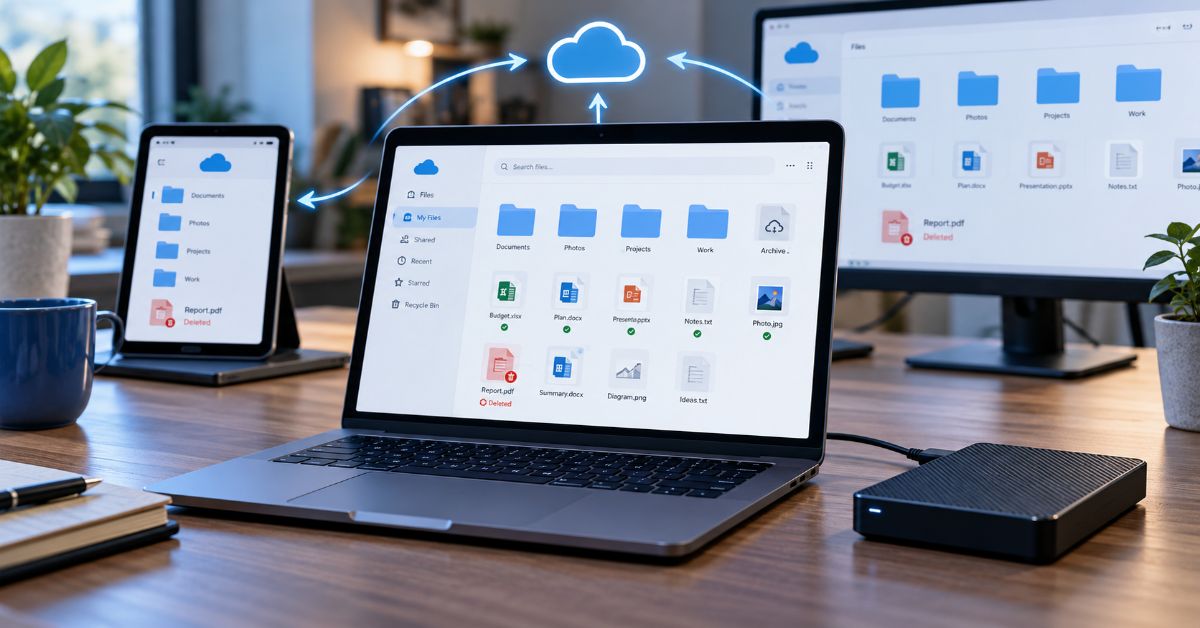
OneDrive makes files available across devices, but that convenience is exactly why it cannot serve as the only backup: a deletion or damaged file can synchronize to the cloud before anyone notices. If the recovery window closes, having seen the document in File Explorer is not proof that a recoverable copy remains. The useful question is not “is my folder in the cloud?” It is “what separate copy could I restore after a bad change has spread?”
Consider a small business editing invoices on a laptop and a desktop. A staff member accidentally deletes a synced folder. Microsoft documents that local deletions can be synchronized to the cloud and then to other connected devices. That is working-as-designed synchronization, not evidence that a secure historical backup exists (Microsoft, n.d.-a).
The same logic applies to ransomware and account compromise, although the recovery path differs. An infected machine may encrypt local files that then synchronize; an intruder with account access may delete cloud files outright. Version history, the Recycle Bin and subscription-based file restore can help, but they are conditional recovery capabilities, not permanent, isolated archives.
This distinction matters more than a feature checklist. The decision should start with the particular loss a reader wants to survive: a broken laptop, a wrong edit, a deleted folder, a locked account or a major security incident. Each asks a different question of the storage system.
Sync, Cloud Storage and Backup Solve Different Problems
Sync aims to maintain a consistent current state across endpoints. Cloud storage keeps files on remote infrastructure and makes them accessible after a device failure. Backup preserves independent recovery points, ideally outside the systems that can modify the working files. A service can offer features from all three categories without providing complete system protection.
The key operational difference is the fate of a bad change. Sync usually distributes it. Version history may roll it back. An independent backup should still allow recovery if the cloud account, deletion history or subscription is unavailable.
| Capability | Synced OneDrive files | Independent backup |
| Access on another device | Usually yes after upload completes | Possible, but recovery may require restore |
| Deletion propagation | Can synchronize deletion | Historical restore points can survive |
| Operating system and installed apps | Not a full system image | Possible with appropriate backup software |
| If cloud account is locked | Access may be unavailable | Separate destination may remain accessible |
Five File-Loss Scenarios and Their Real Recovery Paths
A laptop dies but the uploaded files remain
This is where cloud sync shines. If the required files uploaded successfully before the laptop failed, the reader can sign in on a new device and retrieve them. Unsynced folders, local application data and system settings are a different matter. A healthy sync icon is useful evidence, but a check in the web interface is better: the document must actually be present and openable there.
A spreadsheet was overwritten yesterday
Version history is the first place to look. In the web interface, select the file, open Version history, inspect the available revisions and restore the correct one. Microsoft says version history works across file types, although retention and administration can vary. Restoring an older revision changes which version is current; inspect before choosing (Microsoft, n.d.-b).
An entire project folder was deleted
The web Recycle Bin is the first cloud recovery point. Personal-account files are typically recoverable for 30 days, while work or school items are normally retained for up to 93 days, subject to administrator changes. Permanently deleted items cannot be recovered through the ordinary OneDrive Recycle Bin. Check the PC Recycle Bin too, but online-only deletions may appear only in the cloud bin (Microsoft, n.d.-c).
Ransomware changed hundreds of documents
Stop synchronization and isolate the infected machine following incident-response guidance before performing large restores. Eligible Microsoft 365 subscribers can use Restore your OneDrive to reverse cloud file actions from the prior 30 days. The feature is not available to every free user and does not substitute for cleaning an infected endpoint. A recovery can also affect later file changes, so review its activity timeline before proceeding.
The account is locked or an attacker emptied the bin
Cloud-based self-service recovery may no longer be sufficient. A disconnected external backup or a separate backup service with independent credentials becomes the recovery path. This is also why multifactor authentication and careful sharing are useful but should not be confused with backup: prevention reduces some risks while independent copies limit their impact.
Choose Recovery Tools by What Actually Went Wrong
The following decision table avoids a common mistake: using a full-library restore when only one file needs an earlier version.
| Symptom | First recovery route | Important limitation |
| One file has wrong edits | Version history | Available revisions and policies vary |
| File or folder deleted | OneDrive web Recycle Bin | Time-limited; permanent deletion may be final |
| Many files corrupted | Restore your OneDrive if eligible | Microsoft 365 feature; 30-day window |
| Folder never uploaded | Search local storage / separate backup | Cloud cannot restore a file it never received |
| Whole PC must be rebuilt | System-image or endpoint backup | OneDrive does not reinstall the OS and apps |
| Cloud account inaccessible | Offline or independent backup | Do not rely on same cloud login |
For access-control problems, recovery is often tied to identity. The site’s Entra admin center guide offers useful context on Microsoft identity administration, while this article stays focused on what individual file owners can restore.
A Safer Setup in One Afternoon
Check exactly which folders are synchronized
Open OneDrive settings and review the folders covered by PC folder backup. Desktop, Documents and Pictures may be included depending on configuration; other places such as custom work directories, external disks or application databases should never be assumed covered. Open the website and sample several recent critical files to confirm upload.
A second issue is ownership. Items shared from another person’s account are not necessarily part of the recipient’s own OneDrive recovery scope. Microsoft explicitly warns that its self-service recovery may not restore someone else’s shared files. Projects with multiple owners need an agreed owner and recovery procedure, not merely a shared link.
Use Files On-Demand without confusing space saving with protection
Files On-Demand can show online-only files in File Explorer without keeping complete local copies. “Free up space” removes the locally downloaded contents; it does not delete the cloud file. By contrast, deleting the file itself from the synced folder can remove the cloud copy. That tiny wording difference has expensive consequences on low-storage laptops.
Keep critical documents available offline where practical, but remember that an offline copy synchronized later may still transmit unwanted changes. Independence comes from a separate backup that does not automatically mirror every edit or deletion.
Add an independent recovery destination
A simple 3-2-1-style plan keeps working files in the cloud, periodic backups on an external drive or NAS, and an additional copy in separate storage, ideally with one copy offline or immutable. The traditional 3-2-1 wording means three copies, two media types and one off-site copy; the practical goal is to avoid one account or one bad command affecting every copy.
For a freelancer, a weekly external backup may be enough for replaceable drafts but not for active client deliverables. For a company that changes transaction records throughout the day, the recovery-point objective needs to be much tighter. Choose schedule and retention from acceptable data loss, not from the default interval shown in a product.
Readers protecting shared business devices can extend this with the site’s computer virus prevention guide, which focuses on practical infection prevention and restore checks.
Protect the login and audit sharing
Enable a strong multifactor sign-in method, remove obsolete shared links, review access after contractor departures and keep recovery contact methods current. A separate backup should use credentials and permissions that ordinary collaborators cannot delete. For the identity basics behind this, the site’s two-factor authentication explainer gives a useful companion explanation.
Prove the restore actually works
Once every quarter, choose a document, restore an older revision or backup copy to a new location, open it, and record how long recovery took. Do not overwrite the production original during a drill. For teams, also simulate a missing employee and verify that an authorized replacement can access recovery credentials and storage.
A backup with no successful restore test is only a claim. The drill exposes missing folders, expired credentials, corrupted archives, inaccessible devices and recovery times that exceed what the business can tolerate.
The Hidden Risk: Your Recovery Clock Starts Before You Notice
Cloud recovery windows are expressed from the event, not from when the owner discovers it. A missing folder noticed after a long holiday may have far less time left than expected. Versioning rules and work-account retention can differ, and a bulk restore can reverse legitimate edits made after the chosen restore point. These are operational risks, not obscure technical footnotes.
Suppose a mistake is discovered 28 days after deletion in a personal account. If the standard 30-day Recycle Bin window applies, the decision is urgent. A weekly backup with six months of retention might still hold the previous state even when the cloud bin expires. By comparison, a daily mirror that silently deletes removed files offers little historical insurance.
The most useful metric is recovery coverage: the share of important data for which there is a separate, recently tested restore point. Cloud capacity in gigabytes is not a substitute for that metric. A larger paid plan can hold more data while still leaving the backup strategy weak.
The site’s privacy and cloud security case study addresses the broader consequences of credential misuse, a reminder that cloud access security and data recovery are related but separate problems.
What the Microsoft 365 Plan Changes—and What It Does Not
Subscription status changes access to certain bulk-recovery controls, not the fundamental sync design. Microsoft describes Restore your OneDrive as a Microsoft 365 subscriber feature capable of undoing file and folder actions within the prior 30 days. That is valuable after a broad corruption event. It is not equivalent to a complete computer backup, indefinite retention or guaranteed recovery after permanent deletion.
| Setup | Suitable for | Residual weakness |
| OneDrive alone | Convenient access and modest-risk documents | No independent restore point |
| OneDrive + external versioned backup | Personal files, freelancers, home offices | Drive can fail or be stolen; rotate or disconnect |
| OneDrive + external + separate off-site backup | Business-critical or hard-to-recreate work | More cost, configuration and testing |
The “best” tier depends on loss tolerance. A student with replaceable lecture slides may rationally choose a lighter setup than a consultant holding signed contracts. But documents that cannot be recreated deserve an independent copy even when cloud recovery seems generous.
The Future of OneDrive in 2027
The most realistic expectation for 2027 is tighter integration among collaboration, identity checks, cloud storage and recovery workflows, rather than a guarantee that synchronization will become an independent backup. Microsoft already provides granular file history, a cloud Recycle Bin, Files On-Demand and a subscriber-only time-based restore. These features suggest a continuing emphasis on convenient recovery within the Microsoft ecosystem, but Microsoft has not made every possible future retention or licensing change certain.
For users, a larger change may be behavioral: more work is created across several devices, browsers, shared folders and applications. A folder that looks local is often a cloud-backed workspace with multiple actors. This increases the need to distinguish ownership, access rights and historical recovery. A business cannot assume the person who can edit a shared file is also the person who can recover it after the owner account is gone.
A sensible 2027 plan therefore does not depend on speculation about new features. It documents file locations, tests restoration, separates backup credentials and reviews account-specific service terms when they change. The strongest technology roadmap is the one that remains usable after the primary cloud account becomes unavailable.
Key Takeaways
- Treat sync as convenience and continuity, not a substitute for history you control.
- Check the web copy of a file rather than assuming a local status icon proves upload.
- Choose Recycle Bin, version history or bulk restore according to the failure.
- Know that personal and work or school retention periods can differ.
- Keep at least one backup insulated from ordinary sync and sharing permissions.
- Run a small test restore before you need an emergency recovery.
Conclusion
OneDrive is useful because it reduces the friction of moving between computers, sharing work and recovering some recent mistakes. It genuinely improves resilience when a laptop breaks and the needed documents have already reached the cloud. Yet it offers a different kind of safety from an independent backup. In a synced workspace, an accidental deletion or corrupted file can become the new current state everywhere.
The right response is not to abandon cloud storage. It is to define a recovery plan for the failures that matter most. For a home user, that may mean checking selected folders and keeping a rotated external backup. For a team, it means explicit retention, restore responsibilities and credentials that survive a compromised account. Either way, an occasional restore test supplies evidence that promotional feature names cannot.
Keep the cloud copy for speed, collaboration and everyday accessibility. Keep an independently recoverable copy for the day those advantages are no longer enough.
Frequently Asked Questions
Is OneDrive a backup or a sync service?
It is primarily cloud storage and synchronization, with several backup-like recovery features. Those features can restore some recent deleted or overwritten files, but they are not a full independent system or long-term archive.
Does OneDrive back up my entire computer?
No. It does not automatically create a restorable Windows installation, applications or every custom folder. Review the PC folder backup selections and use a separate system backup if full-device recovery matters.
How long are deleted OneDrive files recoverable?
Microsoft lists a typical 30-day period for personal cloud Recycle Bin items and up to 93 days for work or school accounts, unless an administrator changes policy. Permanent deletion and special circumstances can shorten options.
Can OneDrive recover files after ransomware?
Sometimes. Version history and eligible Microsoft 365 bulk restore can reverse certain unwanted changes. Recovery still depends on timing, account access and the specific damage; isolate infected devices and use independent backups when needed.
Does Files On-Demand mean files are saved twice?
No. An online-only item may have no full local content copy. Files On-Demand reduces disk usage; it does not supply an independent historical backup.
Should I use an external drive if I already pay for Microsoft 365?
For irreplaceable work, yes, or another separate backup destination. The subscription improves some recovery options but does not guarantee protection against every deletion, lockout or device-wide loss.
How often should I test file recovery?
Quarterly is a reasonable starting point for many personal or small-office workflows. Higher-risk businesses should test more often and measure whether recovery time and acceptable data loss are being met.
Methodology
This article was developed from Microsoft Support documentation on version history, restore, the Recycle Bin and Files On-Demand, plus Microsoft Learn guidance on synchronized deletion behavior. Scenarios and recommendations are editorial analysis, not firsthand product testing. Actual behavior can differ by plan, region, administrator policy and future Microsoft revisions. Unlike a vendor comparison, the aim here is to match each potential loss to an appropriate recovery mechanism.
References
Microsoft. (n.d.-b). Restore a previous version of a file stored in OneDrive. Microsoft Support.
Microsoft. (n.d.-c). Restore files deleted from your OneDrive. Microsoft Support.
Microsoft. (n.d.-d). Restore your OneDrive. Microsoft Support.
Microsoft. (n.d.-e). Save disk space with OneDrive Files On-Demand for Windows. Microsoft Support.

Quicklinks are prominent links that take people directly to important website tasks, but a crowded shortcut panel can make finding a page harder than using the main menu. The real measure of a shortcut is not whether someone clicks it. It is whether they reach the correct destination with less effort and complete what they came to do.
A student checking tuition, a customer tracking an order, and an employee requesting IT help each have a specific goal. “Resources” or “Useful links” says little about any of those goals. Even a prominent block of fourteen links can demand more scanning than a familiar navigation menu. That is why shortcut design starts with recurring tasks, not the pages an organization wants to promote.
A main menu shows the shape of a website. A shortcut should bypass part of that structure for a sufficiently common, costly, or urgent action. Where ordinary navigation and search already work well, adding a shortcut may accomplish nothing.
This guide supplies a practical selection model called the 3R Score, a placement map, a before-and-after redesign, a measurement plan, and a reusable audit worksheet. Its thresholds are editorial starting points to test, not universal UX laws. Most importantly, it separates getting attention from actually helping users succeed.
The difference between a shortcut and another menu
Several clickable elements may look similar but serve different jobs. Confusing those jobs is how a site accumulates duplicated links without improving findability.
| Element | Primary purpose | Best example | When it fails |
| Main navigation | Show information architecture | Products / Solutions | Too many competing categories |
| Quicklink | Skip to an important task | Track order | Repeats a visible menu option without benefit |
| Call to action | Prompt a preferred next step | Start free trial | Pushes conversion where users need support |
| Footer link | Provide secondary reference access | Privacy policy | Hides time-sensitive tasks |
The distinction also matters in search results: Google’s automated sitelinks are generated by its systems from site structure. An on-page shortcut panel does not directly control which sitelinks Google displays.
The 3R Quicklink Score: Repeat, Reach, Return
A shortcut deserves premium screen space when users need the destination, the normal route creates friction, and the label accurately predicts the landing page. Score each candidate on three dimensions, from zero to two. Scores are a prioritization aid; they do not replace observing real users.
| Criterion | 0 points | 1 point | 2 points |
| Repeat | Rare task | Occasional task | Frequently repeated or time-critical task |
| Reach | Already easy to reach | Some friction | Buried, confusing, or several steps away |
| Return | Unclear or misleading label | Mostly understandable | Destination and outcome immediately predictable |
Applying the score without gaming it
A score of 5–6 identifies a strong candidate for testing. A score of 3–4 suggests rewriting the label, improving the underlying menu, or moving the link into a contextual area. A score of 0–2 is normally a poor use of prime shortcut space. Critical safety, legal, emergency, and authentication access should be assessed separately, even when volume is low.
Consider “Reset password.” On a member portal, it may earn Repeat 2, Reach 2, and Return 2, for 6/6. On a tiny brochure website with no user accounts, it would be irrelevant. “About us” might score Repeat 0, Reach 0, Return 2: clear, but not a strong shortcut.
A decision tree for borderline links
First ask whether the task is recurring or critical. Next check whether ordinary navigation already provides a short, reliable route. Finally, ask whether the label tells a new visitor exactly what will happen. Only then test a premium placement. A popular page is not necessarily a valuable shortcut; visits can reflect confusion, not demand.
A placement map based on what the visitor is doing
Placement changes what a link means. A “Log in” control can be universal, while “Download invoice” may only make sense inside a customer account. The strongest page designs match shortcut visibility to user context.
| Location | Typical tasks | Starting range | Risk to check |
| Header | Log in, account, search, support | 3–5 | Crowded mobile viewport |
| Homepage | Apply, check status, request quote | 4–6 | Competes with core proposition |
| Sidebar | Download form, related next step | 2–4 | Too remote on phones |
| End of article | Read related guide, try next workflow | 1–3 | Generic recommendations |
| Footer | Reference, policies, contact | Grouped by topic | Critical task buried below fold |
These ranges are conservative design hypotheses, not a tested industry standard. A service with two primary user goals may need two shortcuts; a complex authenticated portal may support more with clear grouping.
Mobile-first priority: keep the essentials visible
Small screens turn an innocent shortcut row into several lines of competing buttons. Preserve the most valuable account, contact, search, or transaction tasks, then expose secondary actions after the page context appears. Do not conceal essential destinations behind interactions available only on hover.
The 14-to-5 redesign: show the actual editing decision
Imagine a municipal service homepage presenting these fourteen equal-weight links: Home, About, Departments, News, Events, Careers, Contact, FAQ, Forms, Payments, Services, Resources, Locations, and Report an Issue. The panel duplicates site sections and forces residents to infer where tasks are hidden.
A task-focused redesign retains five prominent actions: Pay a bill; Report a problem; Apply for a permit; Check application status; Find collection dates. About, News, Careers, Events, and department information remain accessible through the main navigation or appropriate page sections.
This is an illustrative redesign, not a measured case study. It needs validation against local task data: a city with different service priorities should not copy these five labels blindly.
Labels that reveal the destination before the click
A useful construction pattern is verb + object + optional state: “Download invoice,” “Check application status,” or “Book an appointment.” Noun-led names can also work when users recognize the destination, such as “Employee payroll.” Avoid adding the state word when it makes the label unnaturally long.
Replace “More” with a named destination. Replace “Important links” with task categories or direct actions. “Resources” can still be appropriate as a main-menu category; it is weak as a promised shortcut to one specific outcome.
W3C’s link-purpose guidance stresses that link destinations should be understandable from link text or its programmatically determined context. Ambiguous labels also make screen-reader link lists harder to use.
Build shortcut navigation that works for users and crawlers
Use real links and predictable URLs
Create standard HTML anchors with an href and stable destination, not clickable containers dependent on script handlers. Google Search Central explains that crawlable links help discovery and descriptive anchor text helps users and search engines understand the target.
The site’s existing web development best-practices guide covers related fundamentals such as semantic HTML, discoverability, and reliable interfaces.
Prefer durable destination pages over expiring session URLs. If a user must authenticate first, make the intended task easy to resume afterward. A one-click shortcut that strands users at an access-denied screen is not quick.
Separate shortcut UX from search optimization
Relevant internal links can improve navigation and help search engines discover important pages, but duplicating links purely to influence ranking is not a sound strategy. Google does not prescribe a magic count of internal links. New shortcuts should earn their placement through real task value, not keyword repetition.
For broader context on this publication’s content-quality metrics, see its word-count and SEO-quality guide, which distinguishes basic word counts from intent and useful information.
Avoid assuming on-page shortcut links are the same as Google search sitelinks: those results are automatically selected. Optimize the underlying information architecture rather than trying to force a particular search presentation.
An accessibility check before the site goes live
Test shortcuts as working controls, not decorative cards. W3C’s WCAG material supports meaningful link purpose and a visible keyboard focus indicator; page owners should also check contrast, zoom behavior, touch target spacing, and predictable focus order.
- Tab through every shortcut and confirm visible focus.
- Read links without nearby headings; rewrite unclear labels.
- Test at mobile width, 200% zoom, and with a screen reader.
- Do not identify link destinations through color alone.
- Check that menus and disclosures work with touch and keyboard.
- Explain downloads and unexpected new-tab behavior where that context affects decisions.
A useful implementation companion is the site’s React expense-tracker tutorial, which illustrates how interface controls and navigation decisions need implementation discipline rather than appearance alone.
Measure task completion, not shortcut popularity
Instrument both the shortcut click and the downstream task outcome. A link can generate clicks because its label is irresistible while sending users to a dead end. Conversely, a rarely clicked emergency shortcut can be essential. Set a baseline before launching a revised panel, then compare segments by device, task, and audience.
| Measure | Question answered | Warning sign |
| Shortcut click-through rate | Are people using the placement? | High clicks without completed tasks |
| Task completion rate | Did the shortcut help finish the job? | Users abandon after arrival |
| Median steps or time | Is the route actually shorter? | Same or longer journey |
| Site search terms | Do users still hunt for this task? | Frequent searches despite prominent link |
| Destination errors | Does the shortcut work reliably? | Broken links, permission failures |
| Support contact demand | Did self-service improve? | No decline for repeated help requests |
A 60–90-day retirement rule
Review each noncritical shortcut after an initial 60–90 days with adequate traffic, then keep, relabel, relocate, replace, or retire it. Low usage alone is not sufficient: first check impressions, audience relevance, seasonality, destination health, and high-consequence exceptions. A new applicant service may have little usage until the enrollment season begins.
Assign one person responsibility for the inventory. Log the purpose, destination owner, last verified date, audience, label, score, and review decision. This prevents a temporary campaign shortcut from becoming permanent navigation debt.
An audit worksheet teams can use immediately
Copy the column structure below into a spreadsheet or content-management inventory. The example rows are illustrative, not actual website measurements.
| Candidate | R/R/R | Location | Outcome to observe | Next decision |
| Reset password | 2/2/2 | Account header | Successful reset | Keep and test |
| About us | 0/0/2 | Homepage panel | Qualified visits | Move to menu |
| Submit support ticket | 2/2/2 | Customer portal | Ticket completed | Keep |
| Download old brochure | 0/1/2 | Footer | Relevant downloads | Retire or update |
Worksheet fields: destination URL, task owner, user segment, monthly eligible visits, shortcut clicks, destination completions, failed attempts, score date, next review date, and keep/modify/remove rationale. Keep raw click volume separate from task success to avoid rewarding misleading links.
Practical examples across three types of websites
SaaS: distinguish acquisition from account service
A B2B SaaS homepage may need “View pricing” and “Book demo” for prospects, while signed-in customers need “Open dashboard,” “Get support,” or “Reset password.” A panel that mixes all of these equally can burden both audiences. Account controls belong in persistent navigation; pricing or demo actions may need placement on the public site based on buyer stage.
For a more general discussion of how curated shortcuts can become overloaded, compare the site’s existing quick-links guide.
Local service company: let urgency set the order
A plumbing or repair business may prioritize “Call emergency service,” “Request estimate,” “Check service area,” and “Book visit.” But only show emergency wording if the company genuinely provides that service. A false promise of immediate dispatch creates a worse experience than a normal contact form.
University or intranet: permissions are part of findability
A student portal may surface “Pay tuition” and “Register for classes,” whereas a staff intranet may prioritize “View payroll” and “Submit IT ticket.” Role targeting can reduce noise, but hiding a link is not security: backend permissions still need to protect sensitive destinations.
The Future of Quicklinks in 2027
In 2027, shortcut panels are likely to coexist with personalized portals, AI-assisted search, and task-oriented interfaces. Context-aware systems can suggest relevant destinations based on role or recent activity, but their success will still depend on stable links, meaningful labels, and authorized access. This is a direction to monitor, not a confirmed prediction of universal adoption.
The biggest opportunity is a shift from fixed page lists toward verified task paths. Instead of recommending a generic HR page, a portal might expose the correct expense form for an eligible employee. That only works when identity, permissions, content ownership, and error recovery are reliable. Otherwise personalization merely creates inconsistent experiences across accounts.
A hybrid model is the defensible bet: keep a small, explicit set of crucial shortcuts and supplement it with optional suggestions. Give people a way to find the canonical route when recommendations are wrong. Measure task success and accessibility, not just recommendation engagement.
Key Takeaways
- Treat shortcuts as task accelerators, not a second sitemap.
- Score potential links on task frequency, navigation friction, and destination clarity.
- Protect rare but essential safety, authentication, and regulatory tasks from simplistic click-based removal.
- Write labels that predict a specific destination or action.
- Use native HTML links and test keyboard, touch, screen-reader, and mobile access.
- Evaluate completion and errors over 60–90 days before retiring nonessential items.
Conclusion
The hard part of designing shortcut navigation is not choosing a button shape or deciding whether links belong above the fold. It is accepting that most pages do not deserve privileged placement. A site can have hundreds of useful destinations while needing only a handful of prominent task routes for a particular audience.
The 3R Score creates a transparent starting point for that decision. It asks whether a task repeats, whether finding it is unusually hard, and whether the label makes the result predictable. Placement, accessibility, and measurement then determine whether the design delivers on its promise. None of those steps is a shortcut around user research, and the suggested numeric thresholds should be tested rather than treated as laws.
The most reliable system has a named owner, durable destinations, clear labels, and a scheduled review. When a link stops helping, repair the path or remove the shortcut. When it protects an important but infrequent task, preserve access. Effective navigation is not about showing everything. It is about making the next necessary action easy to recognize and complete.
Frequently Asked Questions
What is a quicklink on a website?
It is a prominent link that takes visitors to an important page or task without requiring them to browse through the usual menu structure. The best examples serve predictable repeat needs.
How is shortcut navigation different from a main menu?
Main menus organize categories of content. Shortcut navigation provides direct routes to particular tasks, such as paying a bill or checking an application.
How many quicklinks should a homepage have?
Four to six is a reasonable initial design experiment for many homepages, not an evidence-backed universal limit. The appropriate number depends on task diversity, audience, screen size, and testing.
Where should website quicklinks be placed?
Use the header for cross-site account needs, the homepage for major entry tasks, contextual page areas for relevant next steps, and the footer for secondary reference links.
Are shortcut links good for SEO?
Relevant crawlable links can help search engines discover pages and understand context, but merely adding extra links does not guarantee better rankings or Google sitelinks.
Should a shortcut open a new tab?
Usually preserve the same tab for normal navigation. Consider a new tab only when there is a clear user benefit, and make unexpected behavior understandable.
How do I measure whether shortcuts work?
Compare eligible impressions, clicks, completed tasks, errors, search demand, and time or steps to success. Review noncritical links after enough traffic accumulates, often in 60–90 days.
Methodology
This editorial analysis draws on Google Search Central’s link guidance and automated sitelinks documentation, W3C accessibility guidance, university navigation recommendations, and a sample of live shortcut-navigation articles. The 3R score, placement ranges, and 60–90-day retirement rule are proposed working methods, not independently validated industry benchmarks. The redesign scenarios are hypothetical, and no controlled usability test was performed for this draft.
The site already contains an article on quick links; publication should account for possible search-intent overlap and keyword cannibalization. The provided target domain’s sitemap endpoint could not be retrieved through the research interface, so internal destinations were checked individually against live pages. A human editor must verify live URLs, final wording, citations, and whether the new article merits a separate page.
AI disclosure for publication after editorial verification: “This article was drafted with AI assistance and reviewed by a human editor before publishing. All data, citations, and claims have been independently verified against primary sources.” This statement must not be represented as completed until that review actually occurs.
References
Google. (n.d.). Link best practices for Google. Google Search Central. Source
Google. (n.d.). Sitelinks. Google Search Central. Source
World Wide Web Consortium. (2026). Understanding SC 2.4.7: Focus visible. WAI. Source
World Wide Web Consortium. (n.d.). Understanding SC 2.4.9: Link purpose (link only). WAI. Source
University of California, Santa Cruz. (2024, July 24). Primary navigation best practices. Source
-

 Technology3 months ago
Hitomi la in 2026: Domain Status, Safety and Risks
-

 Technology2 months ago
Scrolller in 2026: How It Works, Risks and Alternatives
-

 General3 months ago
Voozon.com: What It Is and How the Platform Works
-

 Technology3 months ago
Iwara: What iwara.tv Is, How It Works and What to Know
-

 Technology3 months ago
ThomsonKids.com: Website Guide, Topics & Trust Check
-

 Business3 months ago
incabizgrowth.com Review: Content, Trust & Use
-

 Technology2 months ago
Filetype:pdf Windows Update: Find Better Microsoft Guides
-

 General2 months ago
R Politics: How Reddit’s Political Feed Really Works